01
Switch to a single column
Most parsers read top-to-bottom, left-to-right. Two columns mean your right column gets scrambled into the wrong fields or dropped entirely. Workday and Taleo are especially strict about this.
ATS stands for Applicant Tracking System. 97.8 percent of Fortune 500 companies use one. Here is what they do to your CV, how an ATS resume differs from a regular one, and the four rules to convert one into the other.
Drop your CV to start
.pdf, .docx or .doc, up to 10 MB
Prefer not to upload yet? See a sample report
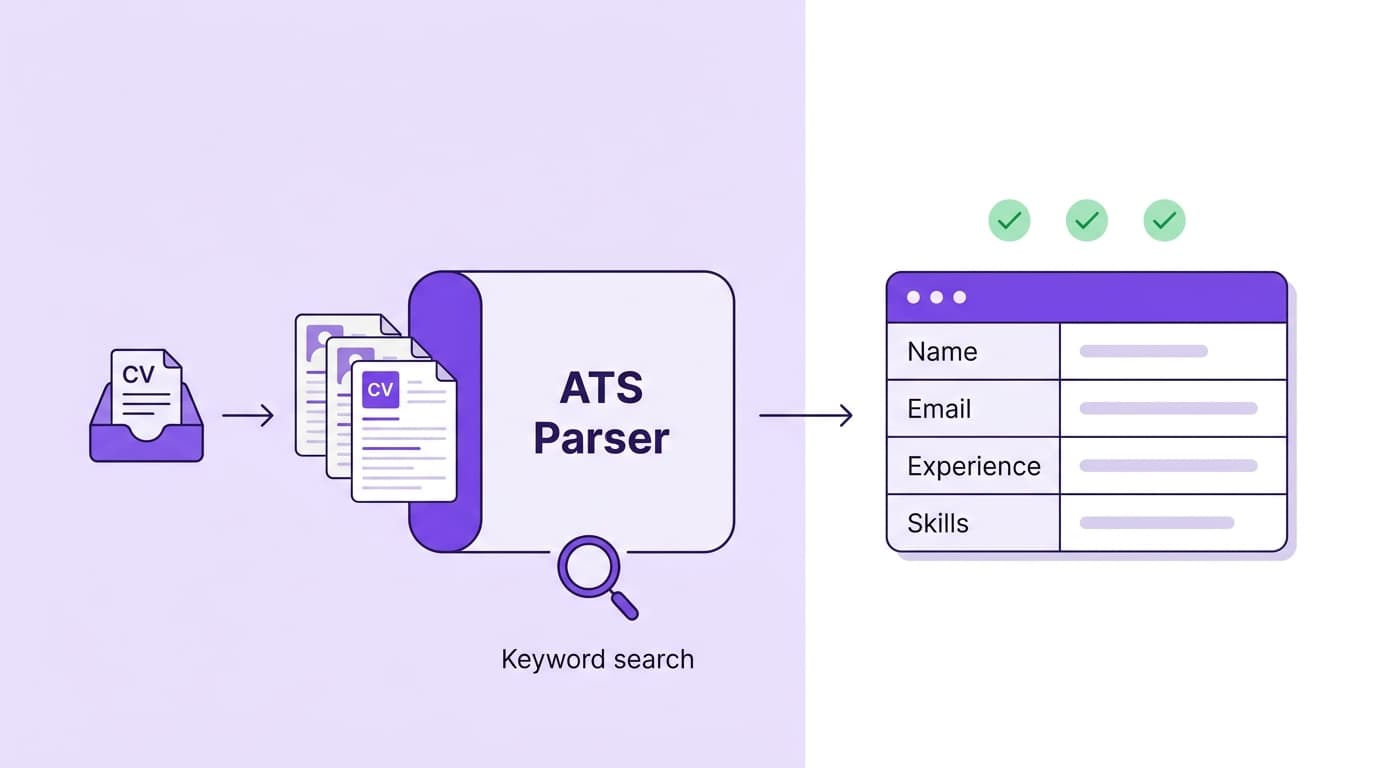
An ATS resume is a CV written and formatted so the applicant-tracking software that 97.8 percent of Fortune 500 companies use can read every field cleanly. The content is the same content a recruiter would expect (experience, skills, education, certifications). The difference is the layout, the section names and the file format, which all have to be parser-safe so your record arrives complete and your keywords match what the recruiter is searching for.
"ATS" is the software. "ATS resume" is the practice of writing your CV so the software can read it. The opposite is a "regular" or "creative" CV: written for a human reader, often with two columns, icons and designer fonts that the parser scrambles or skips.
When you apply online, your CV passes through these four steps before a human ever sees it. Each one has a parser-side risk that an ATS-aware CV avoids.
The parser reads your CV from top to bottom, left to right, and pulls each field into a structured record: name, email, phone, work history (company, role, dates per entry), education entries and skills. This step is purely mechanical, no understanding involved.
The parser groups extracted text into known categories using your section headings as signals. "Experience" goes into the experience field. "Education" into education. Creative headings like "My Journey" get sorted into a generic block and lose their searchable weight.
A recruiter types the must-have terms from the spec into a search box. The ATS scores every CV in the database against those terms and returns the highest matches first. This is where most rejections happen, not at parse time but at search time when your CV ranks below better-matched candidates.
The recruiter sees a list ordered by match score. They click the top 10 to 20 names, glance at each for 6 to 11 seconds, and shortlist from there. A CV that parsed cleanly and matched the keywords reaches a human. One that did not, does not.
The same content, different presentation. The 2026 Jobscan data: 88 percent of employers say they are losing qualified candidates because of CVs the parser could not read.
| Attribute | ATS resume | Regular resume |
|---|---|---|
| Primary reader | Parser first, recruiter second | Recruiter only, no parser |
| Layout | Single column, plain text in body | Often two columns, designed sections, side panels |
| Section headings | Standard: Experience, Skills, Education | Creative names allowed: "My Story", "Adventures" |
| Graphics, photos, icons | None | Welcome and often featured |
| Fonts | Arial, Calibri, Helvetica, Georgia, Cambria, Garamond | Designer fonts, sometimes decorative or display |
| File format | .docx preferred, text-based PDF acceptable | PDF designed for visual fidelity |
| Keywords | Mirror the job spec's wording, exact-match favoured | Natural writing, less keyword discipline |
| Where it gets sent | Online applications, career sites, LinkedIn Easy Apply | Direct email, networking introductions, portfolio sites |
These four moves account for most of the score gap between the median first submission (48 out of 100) and a clean parse (80+).
Most parsers read top-to-bottom, left-to-right. Two columns mean your right column gets scrambled into the wrong fields or dropped entirely. Workday and Taleo are especially strict about this.
Experience, Skills, Education. Boring names are searchable names. Creative names tell the parser the section is not what it thinks it is, and its keywords stop counting.
Header bars and footer regions are skipped by many parsers. Put name, email, phone and city as plain text at the top of page one.
ATS search is mostly exact-match. If the spec says "customer support", your CV says "customer support", not "customer assistance". Aim for 15 to 25 relevant keywords across the CV.
For the full ruleset and per-ATS behaviour, see our ATS-friendly resume guide. For the downloadable template that ships with these rules applied, see the free ATS-friendly resume template.
Drop your CV into the free checker. Score across six dimensions, ranked fix list, parser-specific notes for Workday, Greenhouse and Lever.
Everything we get asked about what an ATS resume is, how it differs from a regular CV, and whether you actually need one.
ATS optimisation
Real ATS-friendly CV examples by role: software engineer, marketing manager, finance analyst, nurse, teacher, product manager and more. Each with a parser-tested layout, sample bullets that score, and what to change for your target role.
ATS optimisation
Real 2026 data on what gets resumes rejected. 77 percent of hiring managers reject for typos. 84 percent for impersonal applications. 49 percent auto-dismiss obvious AI. The full list with the fix for each.
ATS optimisation
Test your resume against real applicant tracking systems. Get a 0–100 score across six dimensions in 60 seconds.
How applicant tracking systems work, what they extract, and where they cut your CV.
Read articleThe skills that score highest in 2026 and how to phrase them so a parser picks them up.
Read articleWhy typography matters for parsing, and the six fonts that always work.
Read article