CV Review
Free ATS check, no sign-up

Free ATS Resume Checker

See how Workday, Greenhouse, Lever, iCIMS and SmartRecruiters read your CV. Get a 0 to 100 score across six dimensions and a ranked fix list, in under a minute.

  • Score in 60 seconds
  • Your CV stays private
  • No sign-up to try
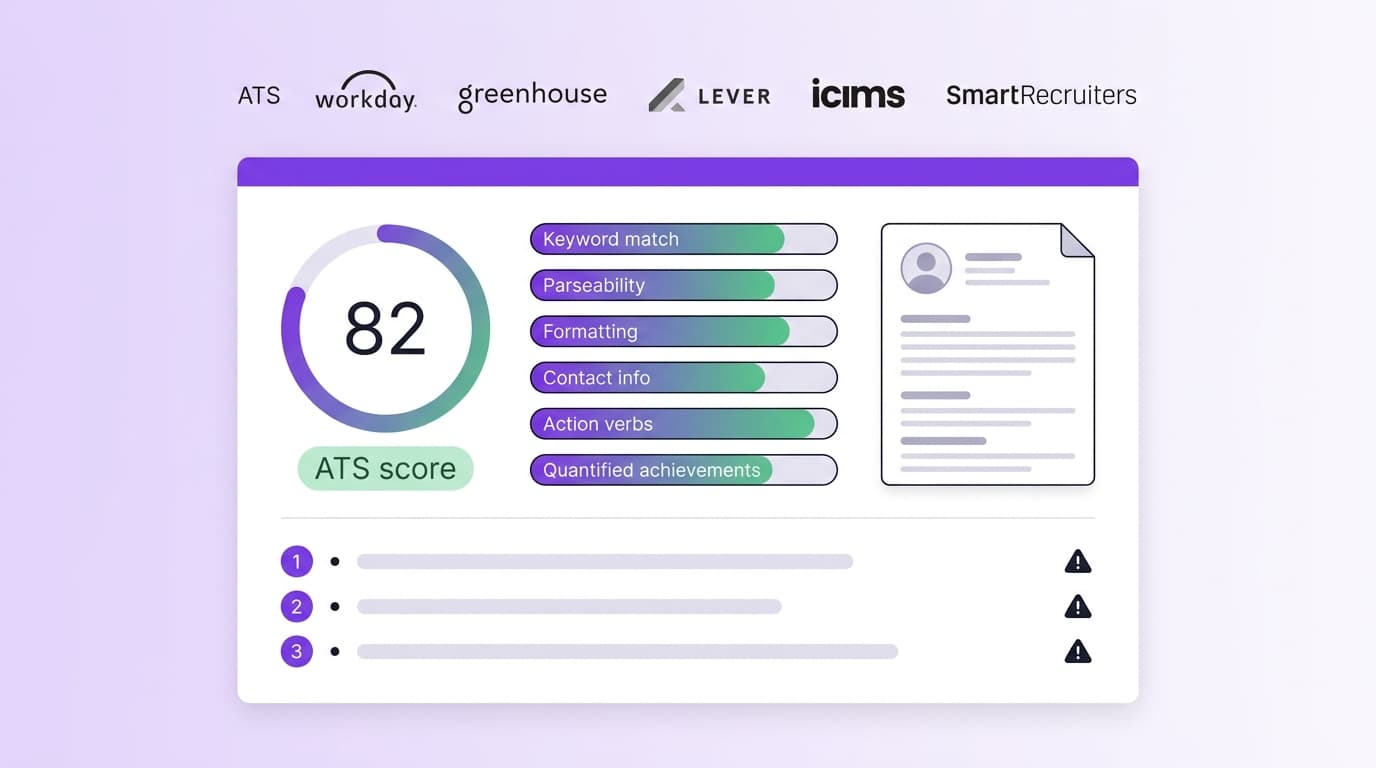
We score your CV across 6 dimensions: keyword match, parseability, formatting, contact info, action verbs and quantified achievements.

Prefer not to upload yet? See a sample report

ATS resume scorecard dashboard showing an 82 score, six dimension bars, a ranked fix list, and wordmark logos for Workday, Greenhouse, Lever, iCIMS and SmartRecruiters
A sample of the ATS scorecard you get after uploading. Six dimensions, an overall score, and the top three fixes ranked by impact.

What the data actually says about ATS in 2026

You see a lot of round numbers thrown around. "75 percent of resumes are rejected by ATS" is the most popular one, and it is false (the ResumeAdapter 2026 teardown linked in the sources walks through the original misquote). Here is what defensible research actually shows.

97.8%

of Fortune 500 use an ATS

Jobscan 2025 ATS Usage Report

~39%

of Fortune 500 use Workday specifically

Jobscan 2025 ATS Usage Report

23%

of ATS parsing failures are caused by formatting alone

Enhancv 2025 parsing study, 25 recruiters, 10+ ATS platforms

3x

higher callback rate for CVs scoring 85% or above

LinkedIn 2025 keyword-optimisation analysis

11.7%

callback rate for ATS-optimised CVs

CVCraft compilation, study of 15,000 applications

4.2%

callback rate for generic CVs in the same study

CVCraft compilation, study of 15,000 applications

6–11s

recruiter initial scan time per CV

ResumeHeatMap 2026 eye-tracking study

35%

higher callback for keyword-optimised CVs vs generic

LinkedIn 2025 keyword analysis

Six dimensions, one score

Most free checkers give you a single number and call it a day. We break the score into the six things that actually decide whether a recruiter ever opens your CV, with weights shown so you know where to spend your editing time first.

01
Weight 25%

Keyword match

How closely the language of your CV mirrors the role you are applying for. We compare titles, tools, methods and seniority terms against a benchmark of postings in your function.

02
Weight 25%

Parseability

Whether ATS systems can extract each field cleanly. We simulate Workday, Greenhouse, Lever, iCIMS and SmartRecruiters and flag where any one of them scrambles a section.

03
Weight 15%

Formatting

Single-column layout, standard fonts, no parsing traps. The Enhancv 2025 parsing study found 23 percent of ATS failures come from formatting alone.

04
Weight 10%

Contact info

Name, email, phone and city detected in the body, not the document header. Many parsers skip header and footer regions entirely.

05
Weight 10%

Action verbs

Strong, varied verbs leading each bullet. Repetition and weak openers ("Responsible for") cap your impact even when the content underneath is good.

06
Weight 15%

Quantified achievements

Numbers, percentages and outcomes in your first two bullets per role. Recruiter eye-tracking research finds quantified bullets attract measurably more fixation than text-only descriptions.

How major parsers actually treat your CV

Every ATS has its own quirks. A layout that scores 90 in Greenhouse can score 60 in Workday because the parsers were built years apart with different priorities. We benchmark against each one so a single score tells you the worst case, not just the best.

Workday

~39% of Fortune 500

Reads strictly left to right, top to bottom. Acquired HiredScore in 2024 to add AI-driven candidate grading on top of parsing. Two-column layouts and right-side contact rails commonly land at the bottom of the parsed record or get dropped.

Watch outs

  • Move all contact details into the body, not the header
  • Keep the layout single column
  • Use standard section headings: Experience, Education, Skills

Greenhouse

Heavy in tech

More forgiving than Workday on layout. Handles well-built two-column CVs roughly 80 percent of the time, but still scrambles right-column content in about one in five attempts.

Watch outs

  • Avoid nested tables, even if invisible
  • Skip text-as-image PDFs from Canva or Figma
  • Keep dates in a predictable format like Jan 2024 to Mar 2026

Lever

Heavy in tech

Similar parsing behaviour to Greenhouse. Re-ranks candidates inside the dashboard rather than auto-rejecting on score, so a clean parse pushes you up the queue.

Watch outs

  • Use parser-safe fonts: Arial, Calibri, Helvetica, Georgia
  • Maintain a dedicated Skills section near the top
  • Mirror the language of the job spec, do not invent synonyms

iCIMS

Common enterprise

Reasonably strong on standard layouts. Drops accuracy when CVs use creative section names like "My Journey" instead of "Experience" because keyword search is weighted by section.

Watch outs

  • Name every section the obvious way
  • Keep skills as a comma-separated list, not rating bars
  • Verify your contact details are in plain text

Taleo

Legacy enterprise and government

The least forgiving major parser. Treats anything beyond the simplest layout as suspicious. Often misreads dates in non-standard formats and ignores formatted bullets in PDF exports.

Watch outs

  • Submit DOCX if the posting allows it
  • Drop graphics, icons and skill bars
  • Use plain bullet points rather than tables

SmartRecruiters

Mid-market and global

Solid parsing on clean documents. Tends to penalise CVs without a clear Skills block by ranking them below candidates whose skills section is easy to extract.

Watch outs

  • Always maintain a Skills section near the top
  • Avoid burying tools inside paragraphs
  • Include both the spelled-out and acronym forms for key skills

For the formatting rules that satisfy every parser at once, see our ATS-friendly resume guide. If you are deciding whether to use ChatGPT to fix the issues our checker flags, read ChatGPT vs purpose-built AI for resume review first.

The six mistakes that drop your ATS score

Every mistake below is fixable in minutes. Each fix typically moves the score by 5 to 15 points.

01

Multi-column layouts

Workday, Taleo and the older parsers read top to bottom in one stream. A right column with dates or contact info either ends up appended after the body or gets dropped entirely.

Move to a single column. If you need visual flair, keep it for the human-facing PDF you send after the ATS gate. Read the full ruleset in our [ATS-friendly resume guide](/hub/ats-friendly-resume).

02

Contact info in the document header

Many parsers skip the header and footer regions of a Word or PDF document. Your name, email and phone disappear before a recruiter ever sees them.

Put name, email, phone and city as plain text at the top of the body. Remove the header bar entirely.

03

Tables used for layout

Layout tables are still common in design templates. Most parsers read tables cell by cell, scrambling skill lists and timelines into a flat run of fragments.

Use bullet lists for skills and a simple top-to-bottom flow for experience. Reserve tables for the rare case where you genuinely need a grid.

04

Skill bars and rating icons

Visual ratings make sense to a designer but the parser cannot extract "intermediate" from a 60 percent filled bar. The skill effectively does not exist in the record.

Use a comma-separated skills list, optionally grouped by category. Add a proficiency word if it matters: Fluent, Native, Working knowledge.

05

Text-as-image PDFs from Canva or Figma

These tools sometimes export text as a series of disconnected glyphs or, worse, as a flat image. The screen reads fine, the parser sees gibberish or nothing at all.

Export from Word or Google Docs, or use a template you have verified by copy-pasting the PDF into a plain text editor. If the text does not paste back as words, the ATS cannot read it either.

06

Generic keywords from the spec missing

A 2025 LinkedIn analysis found resumes with optimised keywords saw 35 percent higher callback rates than generic ones. Without the exact terms the spec uses, your CV sits below the keyword-matched candidates.

Paste the job spec next to your CV and mirror its language for tools, methods and seniority. Do not stuff white-space with hidden text, modern parsers detect and penalise it.

Ready to see your score?

Upload your CV and get a full breakdown across six dimensions in under a minute. No sign-up to see your first score.

Run my free ATS check

Frequently asked questions

Everything we get asked about ATS scoring, parsing and how our checker works.